Files by Google
Google LLCTools
4.5206.96K Reviews
- Version
- 1.13157.1011540316.0-release
- Installs
- 5.00B
- Age Rating
- Everyone
Screenshots
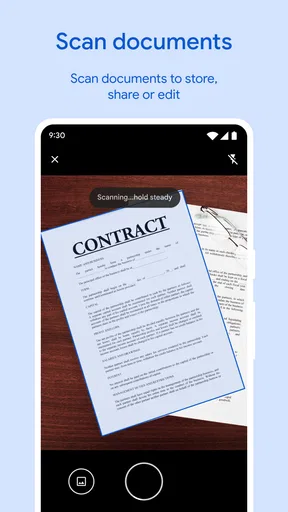
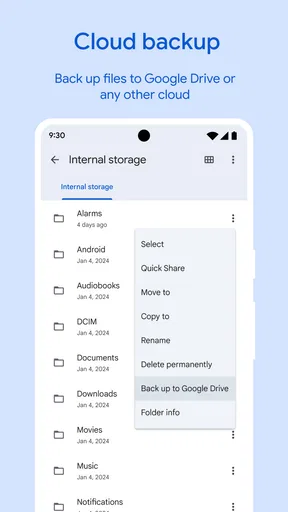
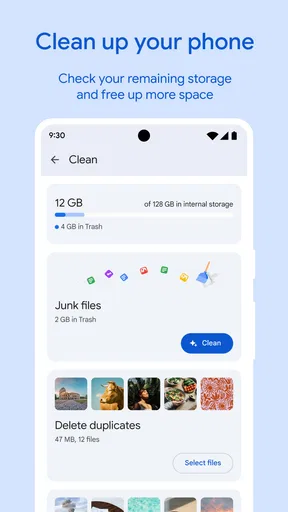
Our Review of Files by Google
 Analysis by Appyee
Files by Google is one of those utilities I appreciate most when I need it: when storage feels crowded, a download has disappeared into a folder, or I want to pass a file to someone nearby. It is a free Android tools app from Google LLC, and its 4.5 average from around 8.9 million ratings, alongside over 5 billion installs, shows how widely people rely on it. My impression is practical rather than flashy: it brings several everyday file tasks together, though it is not a replacement for every specialist tool.
Where the Free App Earns Its Place
I like to judge a free utility by whether it saves me effort without asking me to change how I use my phone. Here, the useful distinction is that Files by Google helps with files already on an Android device; it is not a substitute for cloud storage or a more advanced file manager. That scope makes the next question less about features in general and more about which everyday jobs it handles well.
What “free” means for everyday use
There is no purchase price to weigh up: the app is free. That makes it easy to try as a basic file manager and keep around for occasional cleanup or sharing, rather than paying for a separate utility before knowing whether you need one. Its Everyone age rating also makes it suitable for a broad audience. I would judge its value by whether the built-in tools fit your habits, not by treating “free” as proof that it can do everything.
The version listed as current is 1.11362.916736205.0-release, and the app requires Android 8.0 or later. Its release date is Dec 1, 2017. Those details help set expectations: this is an established Android utility, not a new service whose value depends on a subscription or a one-time purchase. If your phone runs an older Android version, check compatibility before planning to use it.
A cleanup tool that rewards careful choices
The Clean tab gives cleanup a useful starting point by surfacing files and apps that may be worth reviewing. I find that more helpful than opening folders at random, especially when the immediate goal is to make room for a download or a batch of photos. Suggestions should still be treated as suggestions. Before removing something, I would check what it is and whether I still need it; a file that looks expendable in a quick scan might be important to keep.
A practical habit is to use the app as a review queue rather than pressing every cleanup option automatically. Look at large files first, then check duplicate items and old downloads, and only remove things you recognize. This makes the cleanup process less risky and helps avoid the common mistake of deleting a document simply because it has been sitting untouched for a while. The benefit is control, not a promise that every suggested deletion is right for you.
There is a trade-off here: an automatic cleanup specialist may feel more decisive, while Files by Google keeps the broader file-management role in view. That cautious approach suits me when personal photos, saved documents, and media are mixed together. If you want a highly configurable tool that exposes every technical storage detail, you may prefer a more advanced file manager. Files is strongest when you want a readable overview and a clear next step.
Finding a file without remembering its folder
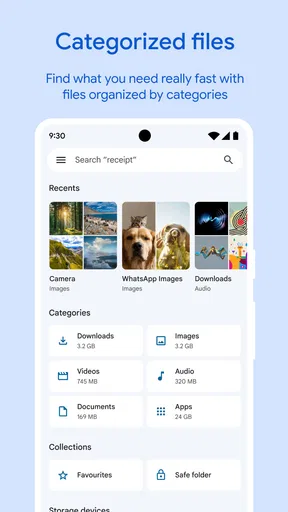
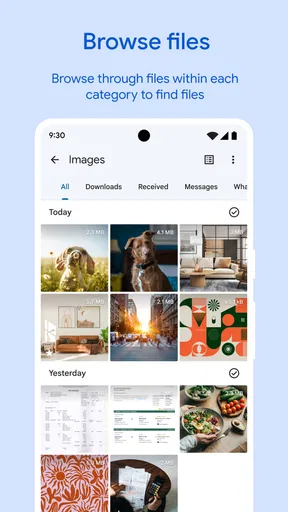
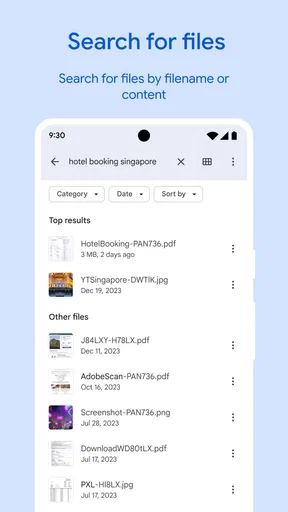
The Browse tab helps when I know what I am looking for but cannot remember where it went. Categories such as Downloads, Images, and Videos provide a useful first pass, while search can narrow things down by name, type, or content. One small but useful workflow is to search before manually browsing several folders: if a file was saved somewhere unexpected, a category-based hunt can waste time.
For example, after saving a document from a conversation, I would first check Downloads or search its name instead of opening each folder. If I cannot remember the exact title, searching by a recognizable term or file type gives me another route. This is especially handy for people who save things from different apps and do not maintain a strict folder system. It is less compelling if you already organize every file into a carefully maintained directory structure.
Compared with a phone’s built-in file browser, the appeal is the combination of a straightforward layout, cleanup suggestions, and sharing in one place. A specialist cloud-storage app may be better when the main job is syncing files across devices or collaborating on shared documents. Files by Google is more useful for handling what is already on the phone. I see it as a convenient front door to local files, not as a substitute for every storage service.
Sharing nearby, with one important condition
The Share tab is designed for sending files offline to someone nearby, which can be useful when a connection is unavailable or you do not want to upload a file first. A realistic example is passing a set of photos to a friend after taking them together: open the sharing flow, follow its prompts, and have the other person ready to receive them. Both devices need the app, so it is worth checking that before relying on this method at an important moment.
That requirement is also the main friction. If the other person does not have Files by Google, a messaging app, email, or a cloud link may be simpler, depending on the file and the situation. Offline transfer is a welcome option, not a universal replacement for online sharing. I would choose it when both people are present and prepared; for someone far away, an internet-based method makes more sense.
For a smoother handoff, decide which files you actually want to send before starting and confirm the recipient is ready. That avoids turning a quick transfer into a search through unrelated folders. It is a small workflow tip, but it matters when you are sharing several items in a busy setting. The app’s value is not just that sharing is available; it is that file browsing and cleanup sit alongside it.
Who is likely to get the most value
I would recommend this app to Android users who want a simple place to inspect downloads, locate media, review possible clutter, and occasionally send files nearby. It is particularly useful for someone who does not want to learn a complicated folder system just to find a document. People who regularly share files in person can also benefit, provided the recipient can use the same app.
It may not be the right choice if you need advanced file operations, a dedicated cloud-sync workflow, or a way to transfer files to people who cannot install the app. In those cases, a more specialized file manager, your preferred cloud-storage service, or a messaging tool may fit better. I would also avoid treating cleanup suggestions as a hands-off maintenance system: a few seconds spent checking what you are deleting is worthwhile.
The app has a large audience and a strong average rating, but neither tells me whether its particular mix of tools matches your routine. The better question is whether you often need to find local files or clear space. If those are occasional annoyances, a free utility that covers both can be a sensible addition without asking you to reorganize your whole phone.
My verdict: useful, as long as its scope fits
Overall, I see Files by Google as a capable everyday tool rather than a complete answer to every storage problem. Its best value comes from bringing file browsing, cleanup suggestions, media access, and offline sharing into one familiar place. I like that range, and I would keep it installed if I regularly needed to manage files directly on an Android phone.
My main advice is to use it deliberately: review cleanup suggestions, search before digging through folders, and check that a nearby recipient has the app before choosing offline sharing. If you want a free, approachable way to handle those everyday jobs, it is worth trying. If your needs center on detailed file control, automatic syncing, or sharing with anyone regardless of their apps, another focused option will probably serve you better.
So, I've been diving into this app called Files by Google, and let me tell you, it's like having a personal assistant for your phone's storage. If you've ever felt that nagging stress of running out of space on your device, this little tool is here to save the day. Let's get into the nitty-gritty of how it works and why it's worth a shot.
Getting Started with Files by Google
First things first, downloading Files by Google is a breeze. It's available on both Android and iOS, so no matter what side of the smartphone fence you're on, you're covered. Once you've got it installed, it greets you with a clean, user-friendly interface. Seriously, even if you're not the most tech-savvy person, you'll find this app super intuitive.
The app is split into three main tabs: Clean, Browse, and Share. Each one serves a unique purpose, making navigation straightforward. Let's break these down a bit.
Cleaning Up the Clutter
The Clean tab is probably my favorite feature. It scans your phone for junk files, large files, and unused apps. You know that feeling when you finally clean out your closet and find all that extra space? That's exactly how this feature makes you feel but for your phone. It gives you suggestions on what to remove and even tells you how much space you'll save. It's like having a digital Marie Kondo in your pocket.
Plus, the app is smart enough to identify duplicate files and memes (because who doesn't have a million of those?). It makes the whole cleanup process quick and painless.
Browsing Made Easy
Next up, the Browse tab. This is where you can get a deeper look into everything stored on your device. It's organized into categories like Downloads, Images, Videos, and more. Finding files has never been easier. I love how it feels like a mini file explorer, but without the clunky interface some other apps have.
The search functionality is top-notch, too. You can easily locate files by name, type, or even content. It’s like Google Search, but just for your phone's storage.
Seamless Sharing
Finally, there's the Share tab. This feature is perfect for those moments when you need to transfer files to a friend without the hassle of cables or internet. It uses Bluetooth to send files, and the best part? No data needed. It's fast and secure, which is a huge plus in my book.
The setup is simple, and it walks you through the steps like a breeze. Just make sure both devices have the app, and you're good to go. It's perfect for sharing photos, videos, or documents on the fly.
Some Final Thoughts
In conclusion, Files by Google is more than just a file manager. It's a comprehensive tool that helps keep your device running smoothly and efficiently. Whether you're looking to free up space, find files quickly, or share content with friends, this app has got you covered.
And let's be real, who doesn't want a clutter-free phone? This app has genuinely made my digital life a lot easier, and I think it could do the same for you. So go ahead, give it a try, and see how much space you can reclaim!
Privacy and Permissions
See what permissions an app requests and how it handles your data.
- Photos/Media/Files
- read the contents of your USB storage, modify or delete the contents of your USB storage
- Storage
- read the contents of your USB storage, modify or delete the contents of your USB storage
- Wi-Fi connection information
- view Wi-Fi connections
- Other
- view network connections, measure app storage space, full network access, run at startup, prevent device from sleeping, modify system settings, read Google service configuration
How Files by Google Compares
Full ComparisonChoose SHAREit for broad, offline sharing, Files by Google for everyday Android storage management, or Smart Switch for moving data to a Samsung phone.
| App | Developer | Rating | Price |
|---|---|---|---|
 SHAREit: Transfer, Share Files | Smart Media4U Technology Pte.Ltd. | 4.3 | Free |
 Files by GoogleThis App | Google LLC | 4.5 | Free |
 Samsung Smart Switch Mobile | Samsung Electronics Co., Ltd. | 3.9 | Free |
Verdict
Strengths of Files by Google
- Simple and intuitive interface.
- Efficient file organization.
- Quick access to storage stats.
- Offline file sharing.
- Integrated cleaning suggestions.
Limitations of Files by Google
- Limited advanced file management.
- No cloud backup integration.
- Advertisements can be intrusive.
- Limited customization options.
- Some features require internet.
Other Releases by Google LLC
View All
Google Calendar
Productivity4.6

Google Messages
Communication4.6

Tools4.0

Google TV
Video Players & Editors3.9
Similar Picks in This Category
View AllGoogle LLC4.0

Gboard - the Google Keyboard
Google LLC4.5

Google Play services
Google LLC4.3

Google Play Store
Google LLC4.9

SHAREit: Transfer, Share Files
Smart Media4U Technology Pte.Ltd.4.3

Google Lens
Google LLC4.7
You May Also Like
View All

Frequently Asked Questions
What is Files by Google and what are its main features?
Files by Google is a versatile file management app designed to help you organize and clean up your device's storage. It offers features like file browsing, sharing, and offline file access. Additionally, it includes a storage cleaner that identifies unwanted files, duplicate photos, and unused apps to free up space efficiently. The app’s intuitive interface makes it accessible for all users.
Is Files by Google safe to use for managing my files?
Yes, Files by Google is safe and secure to use. Developed by Google, it adheres to strict privacy and security standards. Your data is stored locally on your device, and the app does not access your personal files without permission. It also provides encrypted file sharing, ensuring your data remains private and protected during transfers.
Can Files by Google help improve my device’s performance?
Absolutely. Files by Google is designed to enhance your device’s performance by identifying and removing unnecessary files that take up valuable storage space. By clearing cache, deleting duplicate files, and managing large files, the app helps your device run more smoothly and efficiently, leading to improved overall performance.
Does Files by Google support file sharing, and how does it work?
Yes, Files by Google supports fast and secure file sharing. You can share photos, videos, documents, and apps with other nearby Android devices without using the internet. The app uses Bluetooth and Wi-Fi Direct for quick and encrypted transfers. Simply select the files you wish to share and connect to a nearby device using the Share option.
Is Files by Google available for free, and are there any in-app purchases?
Files by Google is completely free to download and use. There are no hidden fees or in-app purchases involved. All features, including file management, storage cleaning, and file sharing, are available without any cost. This makes it an excellent choice for users looking for a comprehensive file management solution without financial commitment.
